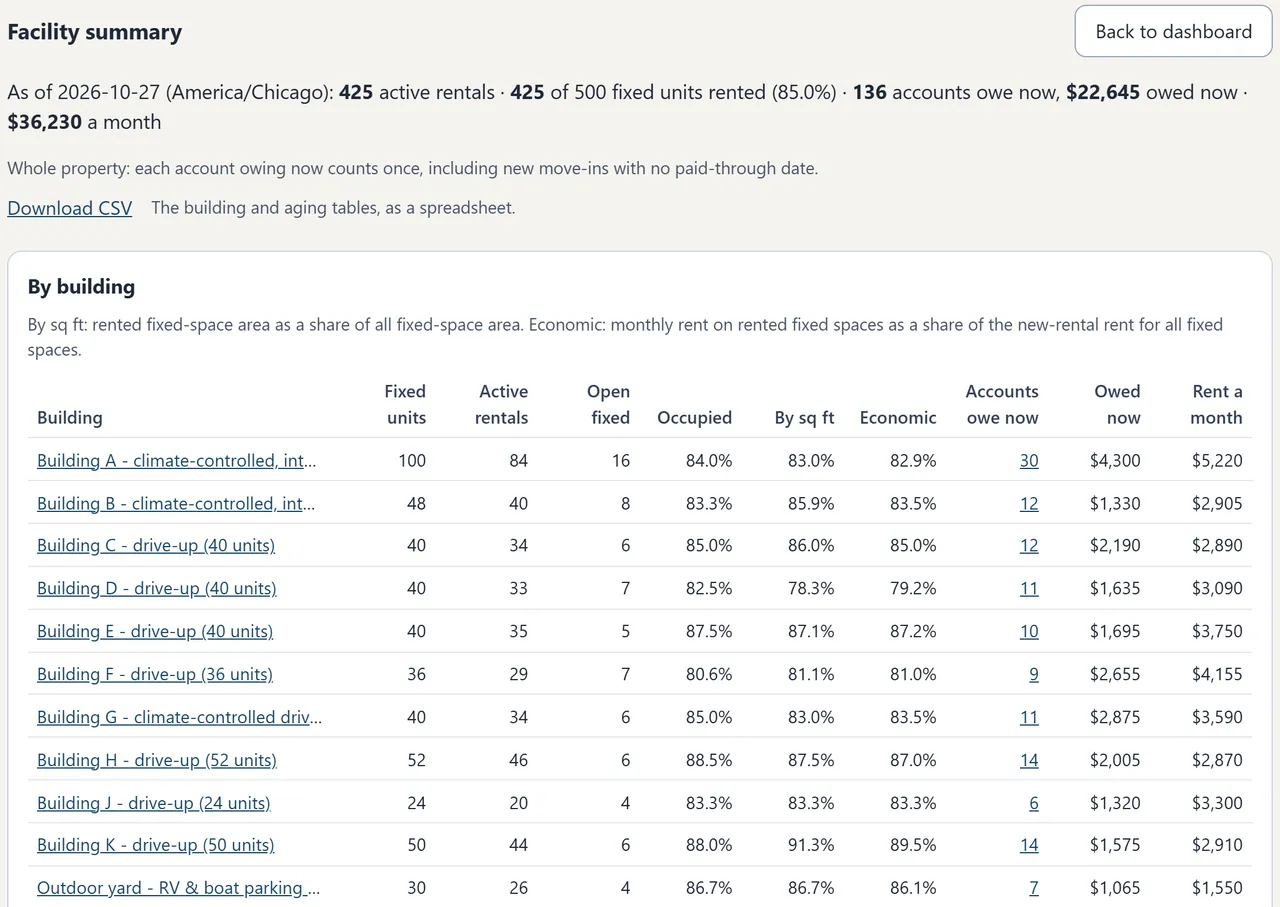
Your property, in one view

See the lot as it is.

Start with the questions you answer each week: who is in that space, what they owe, and who is waiting.

Feature record / engine v0.18.1Released capabilities, with setup requirements and limits.

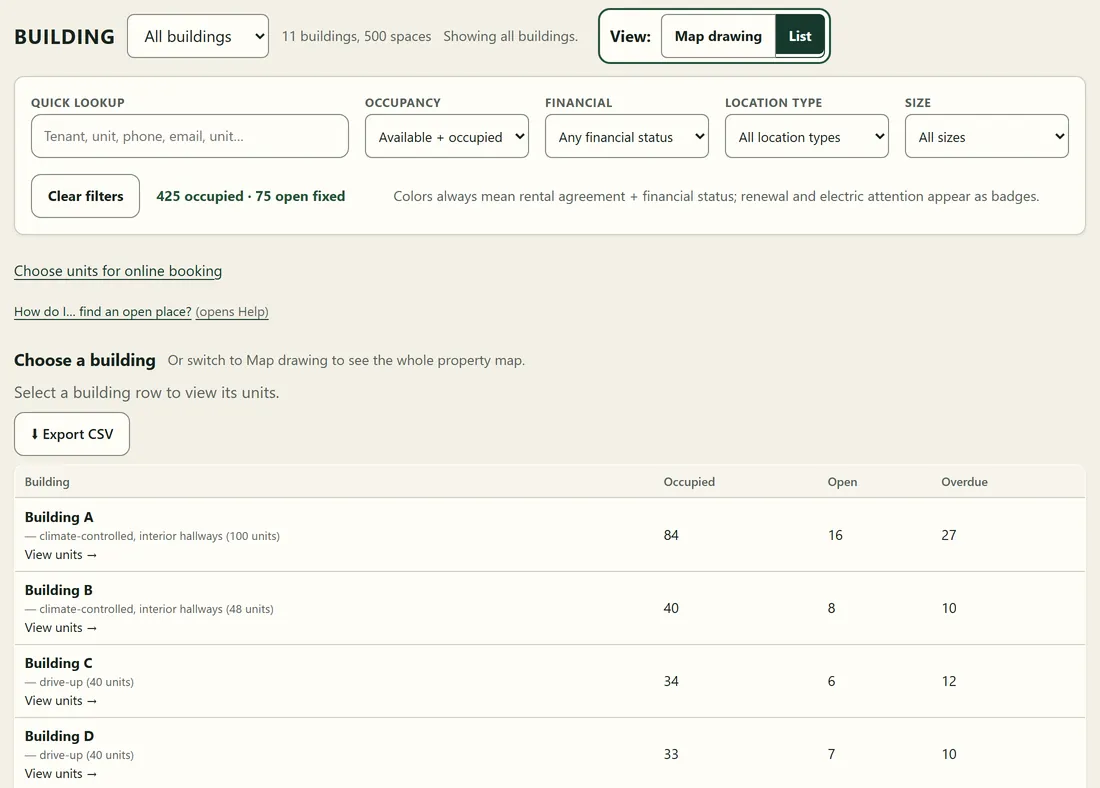
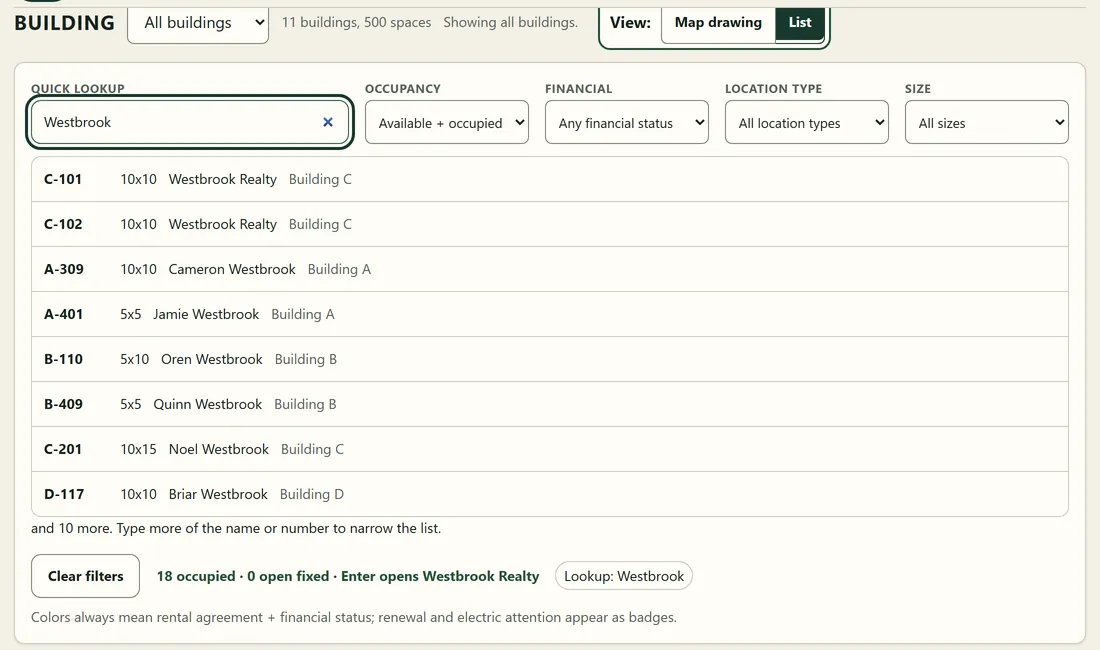
Annotated real BayRoster demo showing property lookup, filters, and status
Real Anytown demo capture / fictional data
Ben's Farm property layout, with the main shop, pole barn, outdoor yard, shaded pad and apron in their actual arrangement
Ben's Farm, Thompson, ND. Customer records and private areas omitted.

The property that started it

A real yard has its own shape.

The shop, pole barn, outdoor rows and the drive between them. This is the layout from Ben's own storage operation, drawn inside the working software.

Your property does not have to fit somebody else's grid. Start with the buildings and spaces you actually have.

This illustration shows the property layout only. Explore fictional customer records in the public demo.

Map

Property first, not a generic dashboard.

Your layout can include buildings, drive lanes, numbered units, fixed slips, and outdoor rows. A whole-property overview is optional and needs layout setup; individual area maps remain available.

Status follows the records

Paid, due soon, overdue, and no-date states are calculated from dates and money. Nobody paints a space green by hand.

Filters answer the next question

Narrow by occupancy, financial state, location type, renewal, or electric-reading attention without changing what the colors mean.

Real demo surface / overview

Moves

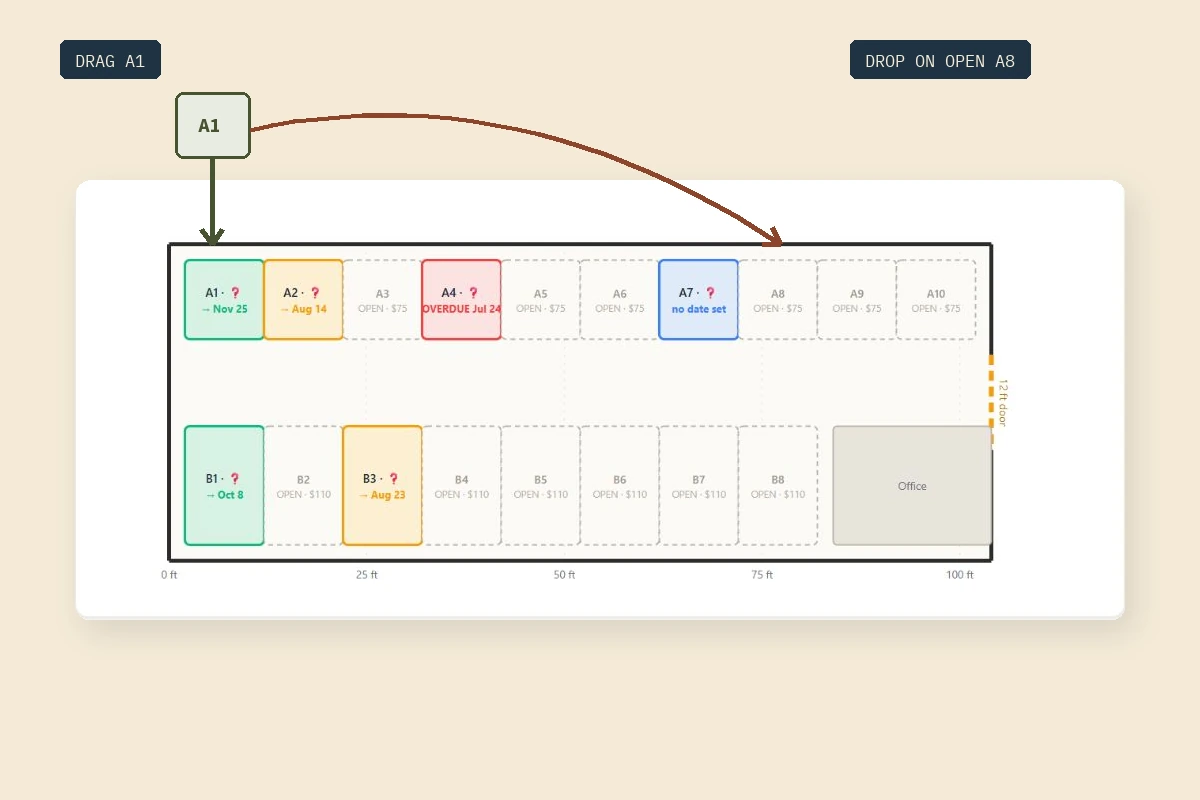
Drag, drop, keep the history.

Drag within an area to open an editor with the new position filled in, then save. Moving across areas uses a transfer that confirms the date and rate. An occupied destination is refused.

Moves are events, not erasures

Contact details, notes, payment history, and a named activity log remain with the customer. You can reactivate an eligible former renter with no active occupancy onto the existing customer and asset records.

Annotated real BayRoster demo showing a renter dragged from one unit to an open one, with the transfer confirmation
Real demo surface / annotation explains the move

Money

Verified before it changes the roster.

Online billing ships off. When enabled, Stripe payments are verified before they are applied. On direct billing, a clean whole-month match extends the paid-until date. Ledger payments are allocated against charges. Unclear matches and payments this software did not start wait for review.

Simple date or full ledger

Run a paid-until date or track charges, payments, oldest-due-first allocation, running balances, and unapplied credit. Neither mode turns BayRoster into accounting software.

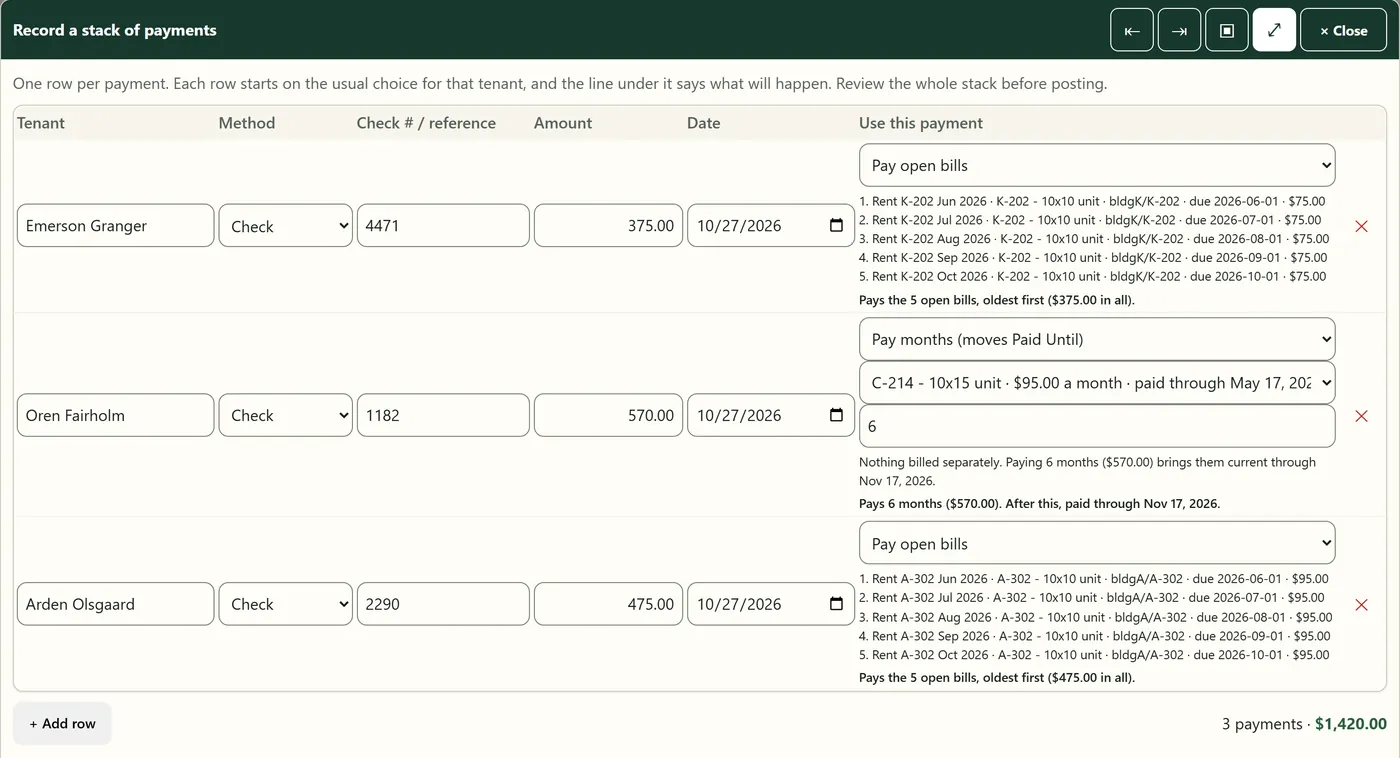
Checks and cash still count

Record a check, cash, or another method by hand without inventing a check number. A payment that looks like a duplicate of one already recorded that day asks before it lands twice.

Annotated real BayRoster demo showing a Stripe payment held in the review queue instead of being applied automatically
Real demo surface / verified money, human review

Customer statements

Their half of the record.

One page per customer: what they rent, what has been charged and paid, and the date they are paid until. Online payment is available when configured.

A link, not a login

A customer can hold a durable link to their own statement, and it still opens months later. No account to create, no password to reset, and no portal for you to administer. You can issue more than one link. Regenerate revokes the existing links, and a change to the customer identity also invalidates them. Treat the link as private: anyone holding it can open that statement.

Paid from that page

With online billing configured, renters pay by card or bank transfer (ACH) on Stripe’s secure page. The software calculates the amount from the account; the renter cannot enter a different price.

Every month behind, not just one

A renter on a paid-until date who is three months behind is billed for all three, added up across every space they rent, with the months and the amount printed under each one. An applied partial payment retires the oldest months and leaves the rest owing. Online checkout uses the quoted amount; a partial payment may need owner review. A space more than twenty-four months behind is quoted at twenty-four; the rest is a conversation with you, not a self-serve charge.

Your rental agreement

When configured, the statement links to your published rental agreement. It does not expose privately signed documents. If the document is not posted, the statement tells the renter to ask you for a copy.

Or paid ahead, deliberately

With online billing configured, a paid-up direct-billed customer can choose one to twenty-four months and pay forward from their existing paid-until date. The map updates from the new date. Accounts with arrears or a ledger balance do not get this option.

Inquiries

The call list lives somewhere on purpose.

Leads can be ranked, noted, followed up, closed without deletion, and converted into the customer record.

One ranked queue

Priority, call notes, request, and status stay together instead of disappearing into texts and sticky notes.

Website intake

Your website can send availability inquiries into the queue. This inquiry form does not hold or assign a space. Online booking is a separate, optional flow.

Review before assigning space

Contact, asset, and start-date details prefill the customer form. You still choose the customer match, location, billing mode, and charge.

Optional online booking

Decide how space is offered.

Online booking is off by default. Setup includes the spaces offered, prices, dates, agreement, and verified payment account before it can be enabled.

Offer a unit or a whole row

Choose eligible units and rows on the property map. A whole row is one rental unit; spare length is not another booking space. Exact spot selection is optional and off by default.

Returning renters wait for your decision

A request matching an existing renter goes to owner review without holding space. Approval checks availability and emails a short-lived payment link. You can decline with a reason.

Prepaid months with a move-in date

Prepaid bookings calculate departure from the move-in date and the number of calendar months. You can limit how far ahead move-in is allowed.

A booking payment is not a move-in

Only a verified payment confirms a booking. It does not automatically create an occupancy, extend the paid-until date, or post to the regular account ledger. Those remain part of your arrival and account workflow.

Your records

Your records should not become vendor leverage.

Ordinary files, ordinary hosting, and a clear export boundary.

Flat JSON files

No database server to administer. The records sit in plain files you can copy, export, and read yourself.

Atomic saves and backups

Records use atomic saves and timestamped backups. If the layout cannot be loaded safely, the map refuses changes.

Customer and location CSV

Customers, assets, locations, and location history export together. An import validates the whole file before saving. Payments, charges, meters, inquiries, layout, and configuration need the separate full backup.

Yearly audit archives

Historical activity survives separately from the live operating files.

Product limits

What it does not do.

Written down here so you do not discover it three weeks into a setup.

No gate or lock hardware

BayRoster tracks occupancy and payment state. It does not open a gate, drive a keypad, or control a lock.

No general accounting

The ledger tracks what customers owe and pay. It does not do payroll, taxes, or replace bookkeeping software.

No nightly reservations

Storage is monthly or seasonal. Campgrounds use PineRoster, a separate product.

No app-store install

It is a website that works in a phone browser. There is nothing to install on every employee’s device.

No scheduled autopay

Renters choose when to pay from their statement. Optional saved-card authorization is off by default and does not enable automatic charges.

No customer portal

A statement link opens one account without a login. It does not let the renter edit customer records or view another account. Booking uses a separate page.

Try the demo

Drag something before you decide.

The live demo is the actual software with fictional data. Password: anytown-demo.